
Tasty
BuzzFeedFood & Drink
4.727.32K Reviews
- Version
- 2.16.0
- Installs
- 10.00M
- Age Rating
- Everyone
Screenshots
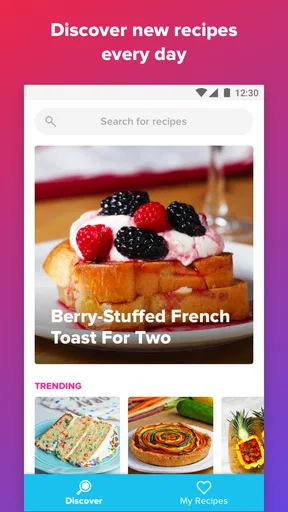
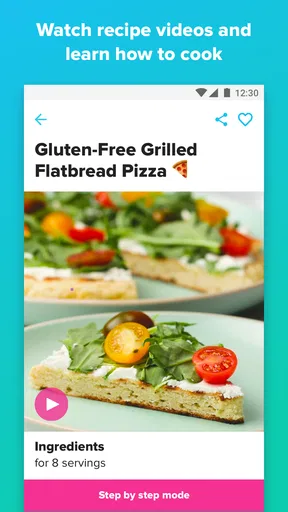
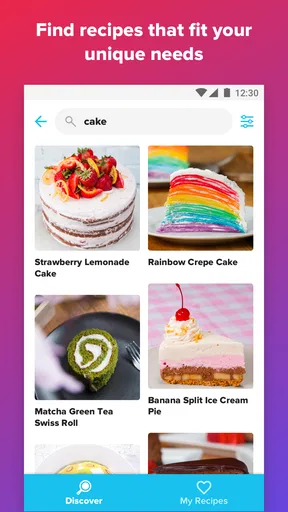

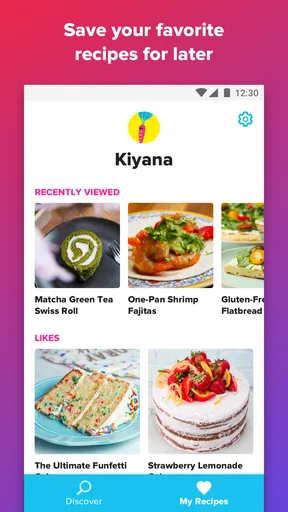
Our Review of Tasty
 Analysis by Appyee
Have you ever had one of those days where you just don't know what to cook? Or maybe you're just tired of making the same old recipes over and over again? Well, let me introduce you to Tasty, the app that's about to become your new best friend in the kitchen. I recently gave it a whirl, and I'm here to spill all the beans about my experience.
Where Tasty fits in my kitchen
For me, a recipe app is most useful before I know exactly what I want to make. That is where this one earns its place: I can browse for inspiration, look for a way to use ingredients already at home, and then follow the cooking steps without juggling a separate video and recipe page. It is a food and drink app from BuzzFeed, and its short, visual approach makes it feel aimed at people who want practical cooking ideas rather than a deep reference book about food.
I would especially recommend it to a beginner who benefits from seeing a technique before trying it, or to someone who cooks casually and wants a nudge beyond familiar weeknight meals. It can also suit a more confident home cook who enjoys discovering approachable variations. If you already plan meals around precise nutrition targets, need highly technical culinary guidance, or prefer to read a detailed recipe before watching anything, a specialist cookbook or a more text-focused recipe service may fit better.
Getting Started with Tasty
So, I downloaded Tasty from the app store, and the setup was a breeze. The app is available on both Android and iOS, so no worries about compatibility here. Once I opened it, I was greeted with a colorful, user-friendly interface that immediately got me excited to start cooking. The app is packed with a vast array of recipes, and it’s like having a personal chef in your pocket.
Readability and recipe navigation
The first thing I noticed was the variety. Whether you're a vegan, vegetarian, or a full-on carnivore, there's something for everyone. You can easily filter recipes based on dietary needs, which I found super helpful. Plus, the app offers step-by-step video tutorials. This is a game-changer for visual learners like me. Watching someone else make the dish first gives me the confidence to try it out myself.
The "What’s in Your Kitchen?" feature is another standout. You just input the ingredients you have on hand, and the app suggests recipes you can make. It’s perfect for those days when you need to whip up something quickly without another trip to the grocery store.
A useful way to get more from those tools is to treat them as a shortlist maker, not as a guarantee that every suggested dish will be an exact fit. I would enter the ingredients I genuinely want to use, then open a promising recipe and check its full ingredient list before committing. That small pause helps avoid choosing a dish that still calls for a key item I do not have. Similarly, dietary filters can narrow browsing, but I would still read the recipe itself carefully whenever an ingredient matters for health or preference.
For a busy evening, I might start with the ingredients left in the fridge, pick a suggestion that looks realistic, and watch the opening steps before deciding. That lets me catch a time-consuming preparation detail early, rather than discovering it after I have already started chopping. It is a practical difference from a basic web search, where results can lead through several pages before I know whether a recipe suits the night I have in mind.
Following the cooking steps
As I started cooking with Tasty, I found the step-by-step instructions incredibly easy to follow. Each step is accompanied by a short video clip, and there's even a handy "Keep Screen Awake" toggle. No more tapping the screen with sticky fingers! The app also allows you to adjust serving sizes, which is fantastic for either a solo meal or a dinner party.
One of my favorite features is the built-in timer. Once you hit the "Start Cooking" button, you can set timers directly within the app. It's such a simple yet effective addition that ensures I don’t burn anything – a personal victory!
That combination of a clip, written direction, and timer makes the app easier to use with messy hands than a recipe page that sends me back and forth between long paragraphs. I still like to read the whole recipe before I begin, though. Videos can make a dish look effortless while hiding the time spent waiting, cooling, or preparing ingredients between steps. Checking the sequence first gives me a better sense of whether I can finish before dinner, and whether I need to set out equipment or ingredients ahead of time.
Motor, sensory, and situational access
The visual guidance can be helpful if written instructions alone are hard to follow, while the text gives me something to refer back to when I do not want to replay a clip. The screen-awake option is particularly practical while cooking: it reduces the need to touch the phone with wet or floury fingers. The timer also keeps a basic cooking task close to the recipe rather than making me switch to another app mid-step.
There are trade-offs. A video-first presentation may be less comfortable for someone who prefers quiet, needs to limit screen stimulation, or finds moving imagery difficult to track. In a noisy kitchen, spoken material in a clip may not be useful, and a small phone screen can be awkward to consult from across a counter. I would place the device somewhere stable and readable before cooking, and use the written steps as an anchor instead of relying on video alone.
For someone with limited dexterity, fewer screen interactions during cooking are welcome, but the app still depends on navigating a touchscreen and entering ingredients for the kitchen feature. That can take extra effort, especially when hands are occupied. I would do the searching and selection before handling food, then use the cooking view and timer once everything is set up. The app can make some parts of a recipe easier to follow, but it does not remove the physical work of chopping, stirring, or managing cookware.
Context matters too. At home, with a phone on a stand and ingredients laid out, the short clips can be a convenient guide. In a crowded kitchen, with glare or limited counter space, they are less useful; I would read the relevant step first and avoid needing to handle the phone while cooking. If I am planning for a group, adjusting servings is helpful, but I still check whether the equipment and cooking time make sense for the larger amount rather than assuming every quantity scales perfectly.
Saving ideas and building a routine
As I explored more, I discovered the "My Recipes" section. Here, you can save your favorite dishes and even create your own collections. This feature makes meal planning a breeze and helps me keep track of what I love to cook. Plus, you can rate recipes and see what others think, which adds a nice community feel to the app.
Another thing worth mentioning is the "Tips and Hacks" section. It's filled with creative culinary tricks and advice that even seasoned cooks might find useful. It’s like having a little chef whispering secrets in your ear.
The collections are most useful when I give them a purpose instead of saving every appealing dish into one large pile. I could keep separate groups for quick dinners, recipes I want to try on a weekend, and dependable meals I already know how to make. That turns saved recipes into a simple planning aid: before shopping, I can look at a few likely options and notice overlapping ingredients. Ratings and other cooks’ reactions can help me decide what to open first, but I would treat them as a signal of interest, not a substitute for checking whether the instructions suit my own kitchen.
This is also where Tasty differs from a plain browser bookmark folder. Its recipe-focused environment keeps saved dishes close to the cooking guidance, which is handy when I return to a recipe. A traditional cookbook can still be better when I want a calm, uninterrupted read, while a broad search engine may be faster when I have a very specific dish or technique in mind. I see this app as strongest for discovery and guided execution, rather than as the only source I would ever need.
What to expect before you rely on it
The app is free to download, has an Everyone age rating, and its current version is 2.14.0. It has a 4.7 average from around 180,000 ratings, with more than 10 million installs. Optional in-app purchases range from $2.99 to $27.99 per item, so I would check the purchase details in the app before paying for anything. Its release date was August 14, 2018, and the listed minimum operating system is version 7.0.
Those details make it easy to understand the basic commitment: I can try the free app first, while purchases are an extra consideration rather than a reason to assume every useful recipe requires payment. The large audience suggests many people have tried it, but popularity alone cannot tell me whether a particular recipe will work for my tastes or equipment. I would judge each dish on its own instructions and ingredients, and keep an eye on any purchase screen if I am only looking for free recipe browsing.
My honest take on its limits
Video-led cooking is the app’s clearest strength, but it also shapes who will enjoy it. If you want recipes presented primarily as long-form text, detailed nutritional planning, or a highly customizable system for managing every household meal, this may feel too focused on quick inspiration. The compact clips are good at showing what to do, yet I still need to think through timing, substitutions, and the tools I have. A video cannot know that my pan is smaller or that I am short on a particular ingredient.
I also would not treat a recipe suggestion as a complete shopping plan. The kitchen ingredient tool can reduce waste and spark ideas, but I still check quantities and missing items before cooking. For guests with allergies or strict dietary needs, careful ingredient review matters more than a filter or a community rating. That extra checking is not a flaw unique to this app; it is a sensible step whenever I use a recipe source that offers a broad mix of dishes.
Wrapping It Up
In the end, Tasty is more than just a recipe app. It’s an inspiring tool that makes cooking fun and accessible. Whether you're a newbie or a seasoned chef, there's always something fresh and exciting to discover. The app's design is intuitive, and the features are thoughtfully crafted to enhance your cooking experience.
If you're looking to spice up your culinary repertoire, I highly recommend giving Tasty a try. It’s a delightful companion in the kitchen, and who knows? You might just find your next favorite recipe. So, go ahead, download it, and get cooking! Your taste buds will thank you.
My recommendation comes with one practical qualification: I would choose it when I want visual inspiration, straightforward guided steps, or a way to make use of ingredients already on hand. I would reach for a text-heavy cookbook or a specialized planning tool when precision, detailed dietary organization, or quiet reading matters more than quick video guidance. For someone who wants to cook more often without turning every meal into a research project, that balance makes it a worthwhile option.
Verdict
Strengths of Tasty
- User-friendly interface for easy navigation.
- Wide variety of recipes for all skill levels.
- Step-by-step video guides enhance learning.
- Personalized recommendations based on preferences.
- Offline access to saved recipes.
Limitations of Tasty
- Contains ads that can be distracting.
- Limited free content; premium required for more.
- No nutritional information for some recipes.
- Recipes occasionally have unclear measurements.
- Requires account for personalized features.
Similar Picks in This Category
View All
Rappi: Food Delivery, Grocery
Rappi, Inc - Delivery3.5

McDonald’s: Cupons e Delivery
Arcos Dorados4.3

Swiggy: Food Instamart Dineout
Swiggy4.7

Blinkit: Groceries & more
Blinkit4.8

foodpanda: food & groceries
Foodpanda GmbH a subsidiary of Delivery Hero SE4.0

Zomato: Food Delivery & Dining
Zomato4.7
Frequently Asked Questions
What is Tasty, and how does it work?
Tasty is a popular cooking app that offers a wide range of recipes, instructional videos, and cooking tips. Users can browse through various categories, save their favorite recipes, and follow step-by-step guides to create delicious meals. The app is designed to be user-friendly, making it suitable for both beginners and experienced cooks.
Is Tasty free to use, or are there any in-app purchases?
Tasty is free to download and use, providing access to a vast collection of recipes and cooking videos. However, the app also offers in-app purchases, such as premium features or content packs, which can enhance the user experience by providing additional recipes and exclusive content.
Can I customize recipes and create shopping lists with Tasty?
Yes, Tasty allows users to customize recipes based on their preferences or dietary restrictions. Additionally, the app provides a feature to create shopping lists, making it easier to organize ingredients and plan meals effectively. This functionality helps streamline the cooking process and ensures you have everything needed for your culinary creations.
Does Tasty offer any special features for dietary preferences or restrictions?
Tasty includes filters for various dietary preferences and restrictions, such as vegan, gluten-free, and low-carb options. Users can easily find and save recipes that align with their dietary needs, ensuring that everyone can enjoy delicious meals tailored to their lifestyle.
Is an internet connection required to use Tasty, or can it be accessed offline?
While an internet connection is necessary to access new recipes and videos, Tasty does offer an offline mode for saved recipes. Users can download their favorite recipes and access them without an internet connection, making it convenient to cook even in locations with limited connectivity.
